iMac SSD Upgrades and Hinge Repair
iMac Hinge Repair & SSD Upgrade – Fixing the Screen That Won’t Stay Up
🖥 iMac Repair
⏱ 3 min read
Does your iMac screen keep tilting forward or drooping down, no matter how many times you push it back up? You’re dealing with one of the most common problems on the slim aluminum iMac: a broken hinge.
From the repair bench 🛠
We had three 27″ iMacs in for SSD upgrades. One of them had an extra problem: a broken hinge in the stand, which left the screen permanently tilted forward.
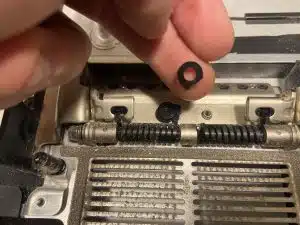
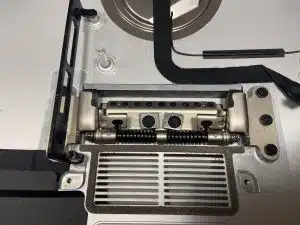
Inside the hinge are some very strong springs that hold the weight of that big display. The problem? Apple holds those springs in place with plastic pieces. Over time, the plastic cracks under the tension — and the screen can’t hold itself up anymore. Not Apple’s smartest design decision. 🙄
Our fix: I added my own custom metal reinforcement pieces behind the hinge springs. Much stronger than the original plastic — problem fixed, and built to last.
Signs your iMac hinge is broken
- ✓ Screen tilts forward – and won’t stay at the angle you set
- ✓ Screen droops all the way down – facing the desk
- ✓ Loose or wobbly stand – the display feels floppy when touched
- ✓ A snap or crack sound – when adjusting the angle
⚠ A known issue
This problem was common enough that back in 2016, Apple offered refunds to some customers who had paid for iMac hinge repairs (read the MacRumors article).
Don’t prop the screen up with books and hope for the best — a sudden drop can crack the display.
Plus: SSD upgrades for all three
All three iMacs also got an SSD upgrade, replacing their slow original hard drives. It’s the single biggest speed boost you can give an older iMac:
- ✓ Faster start-up – seconds instead of minutes
- ✓ Apps open instantly – no more spinning beach ball
- ✓ Your data moved over – files and settings exactly where you left them
💡 Do both at once
If your iMac needs a hinge repair and it’s running slow, doing both in one visit saves time and money — the iMac is already open on the bench. Not sure which iMac you have? Check our Apple Model Identifier.
Why choose JS Information?
- ✓ Stronger than the original – metal reinforcement instead of plastic
- ✓ Mac upgrade specialists – SSD and memory upgrades for older Macs
- ✓ 16+ years in electronics repair – serving Moncton since 2010
- ✓ Save money – fix and upgrade instead of buying a new computer
Got an older MacBook or iMac that isn’t performing like it used to? Check out our Mac repair services — we have solutions that won’t break the bank.
✓ iMac screen won’t stay up?
We’ll fix the hinge — and make it faster while we’re at it.
Serving the Greater Moncton Area
Located at 2 Inglewood Street in Moncton, NB. We provide iMac hinge repair and SSD upgrades to Moncton, Dieppe, Riverview, and surrounding communities.
#iMacRepair
#SSDUpgrade
#MacUpgrade
#MonctonNB
#JSInformation
