
Dangers of inflatable batteries
Swollen Battery? Why It’s Dangerous and What to Do Right Now
⚠ Safety Tips
⏱ 4 min read
At JS Information, we want to give you a serious heads-up: be very careful with swollen (inflated) lithium-ion batteries.
We regularly see iPhones, iPads, laptops, and other devices come in with batteries that have puffed up inside them. A swollen battery isn’t just an annoyance — it can catch fire or even explode if it’s punctured, crushed, or exposed to high heat.
A close call from the repair bench
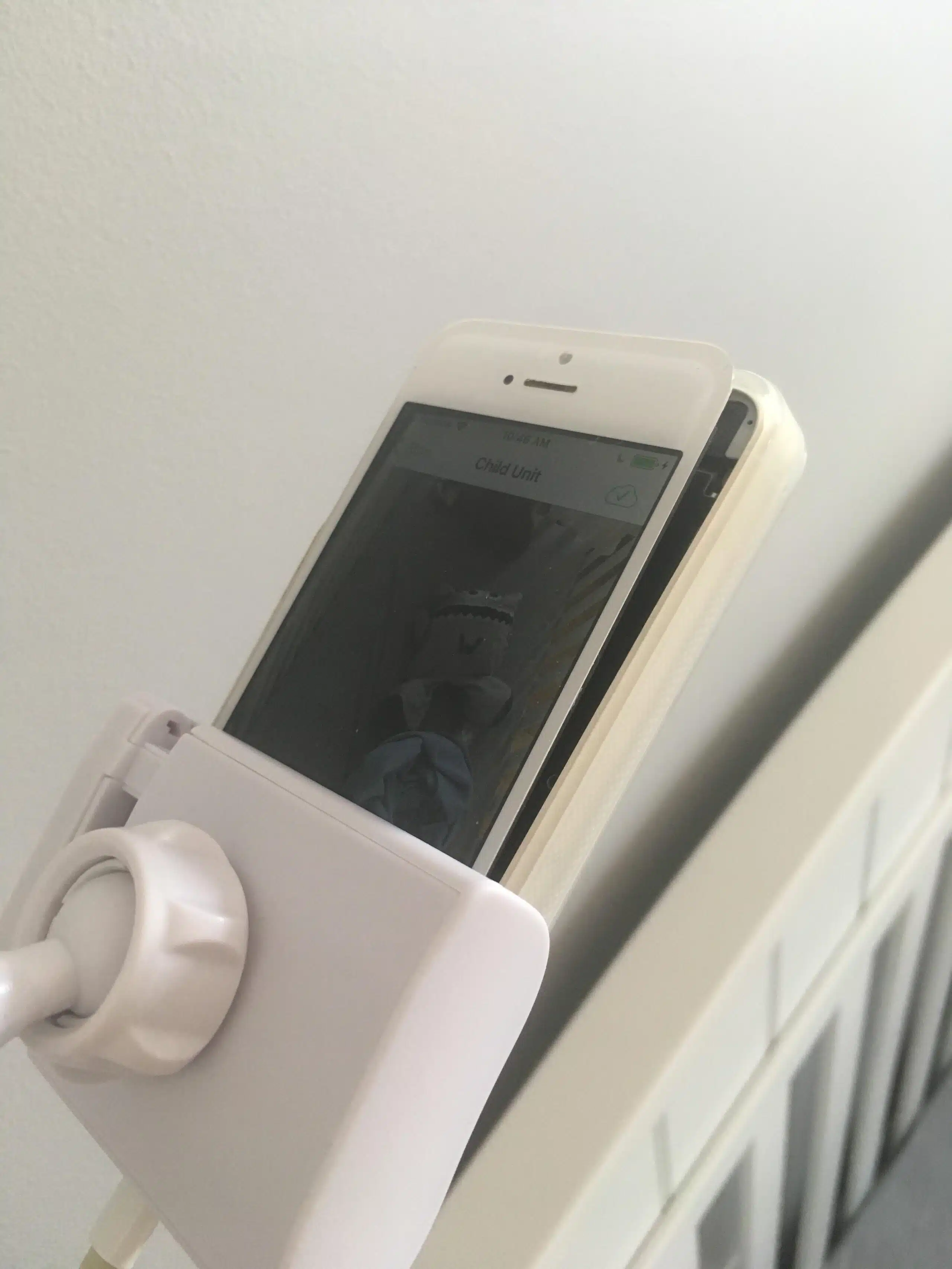
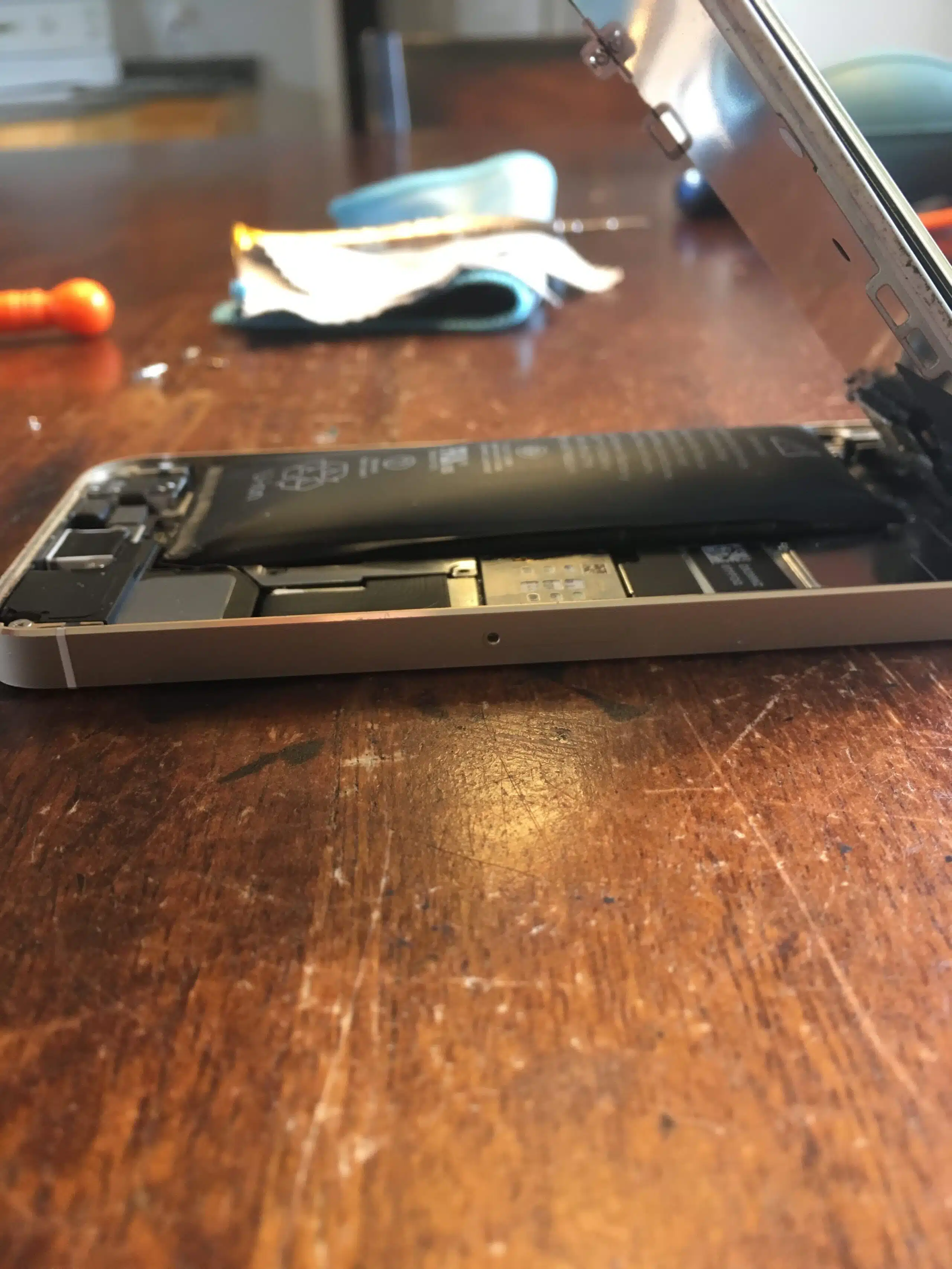
One customer brought in an old iPhone 5S with a badly swollen battery — the battery had pushed the screen right out of the frame. She’d been using it as a baby monitor, right next to her baby’s crib.
No need to tell you what could have happened. Thankfully, she brought it in before it did. It’s a good reminder that old phones repurposed as monitors, music players, or chargers-in-a-drawer deserve a regular check too.
What is a swollen battery?
As a lithium-ion battery breaks down, chemical reactions inside can produce gas. That gas has nowhere to go, so the battery’s soft pouch inflates like a pillow — pushing against the screen, the back, or the case of your device.
There’s no single cause. The most common ones are:
- ✓ Age – older batteries are much more likely to swell
- ✓ Heat – leaving devices in hot cars, in the sun, or charging under pillows and blankets
- ✓ Cheap or damaged chargers – poor-quality chargers and cables can stress the battery
- ✓ Always plugged in – devices left on the charger 24/7 for years
- ✓ Physical damage or defects – drops, bends, or a manufacturing flaw
Signs your battery is swelling
- ✓ Screen lifting – a gap between the screen and the frame
- ✓ Bulging back or case – the device rocks or won’t sit flat on a table
- ✓ MacBook trackpad hard to click – or the bottom case is pushed out
- ✓ Cracked screen with no drop – pressure from behind can crack the glass
- ✓ Gets unusually hot – or has a strange chemical smell
⚠ What to do right now
- 1 Stop charging it and unplug it right away
- 2 Power it off if you can do so safely
- 3 Don’t press, bend, or puncture it — and never try to pry the screen back down
- 4 Move it somewhere safe — a cool, non-flammable surface away from beds, couches, and kids
- 5 Bring it in for a battery replacement as soon as possible
Should you remove it yourself?
On most modern phones, tablets, and laptops, the battery is glued inside and isn’t meant to be removed by the user. Prying out a swollen battery is exactly how batteries get punctured — and a punctured lithium battery can burst into flames within seconds.
If your device has a battery you can pop out easily (like some older laptops), you can remove it carefully. But if it resists at all, stop. Leave it to a technician with the right tools and a safe workspace.
Never throw it in the trash
Swollen or not, lithium batteries should never go in the garbage or the recycling bin. They can start fires in garbage trucks and sorting facilities, putting sanitation workers at risk and harming the environment.
Instead, drop them off at an approved battery recycling location — Call2Recycle has drop-off points across Canada. And when we replace your battery, we take care of the old one safely for you.
💡 How to prevent a swollen battery
- ✓ Use good-quality chargers and cables
- ✓ Don’t charge under pillows, blankets, or in direct sun
- ✓ Never leave devices in a hot car
- ✓ Check old devices — especially ones used as monitors or always left plugged in
- ✓ Replace aging batteries before they become a problem
We replace swollen batteries safely
We handle swollen batteries on iPhones, iPads, MacBooks, and more — removed safely, replaced with a quality battery, and the old one disposed of properly. Learn more about our battery replacement service.
⚠ Think your battery is swollen?
Stop charging it and give us a call. We’ll replace it safely.
Serving the Greater Moncton Area
Located at 2 Inglewood Street in Moncton, NB. We provide safe swollen battery replacement to Moncton, Dieppe, Riverview, and surrounding communities.
#BatterySafety
#LithiumBattery
#BatteryReplacement
#iPhoneRepair
#MonctonNB
#JSInformation
